
Bloomberg Responses
The response files Bloomberg is currently holding for your account. Preview the first rows of a file here, or download the whole file.
Administrators only, once Bloomberg credentials are saved — see Bloomberg Connection.
Opening the page
- Click your avatar at the bottom of the left rail and choose Settings.
- Under DATA, select Bloomberg, then Responses.
Preview, under Latest response in a
request's drawer, opens this page with that file's
preview already showing. The direct link is /setting/bloomberg/responses; the
page also accepts a key value in the address to open a given file.
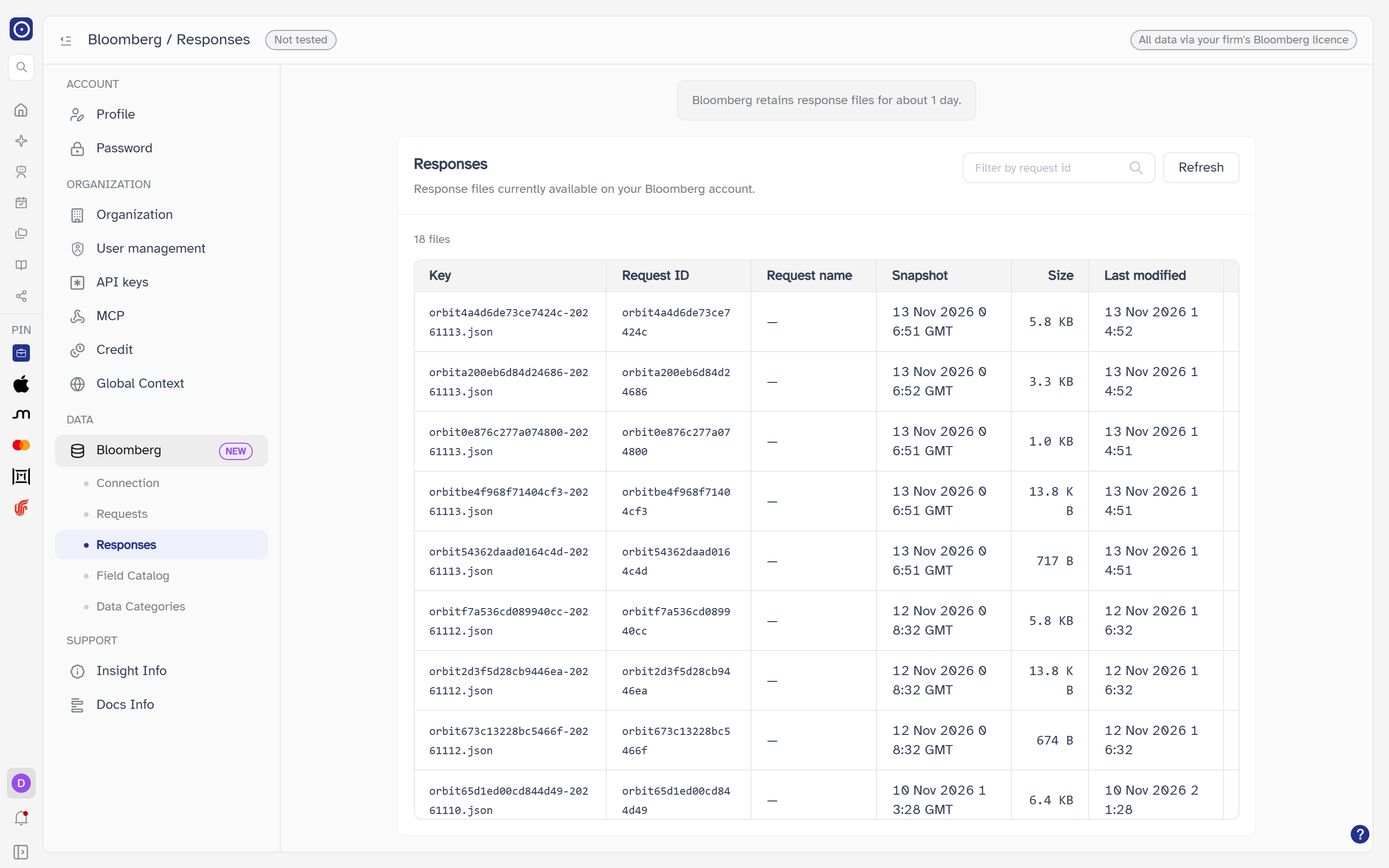
A note at the top of the page reads Bloomberg retains response files for about 1 day. The list is only what Bloomberg holds right now; a file you saw yesterday may be gone. If a file you open from a link has gone, a message reads Response file not found — it may have expired.
The list
The card is headed Responses — Response files currently available on your Bloomberg account. The newest files come first. Under the heading a line gives the count (N files, or 1 file); when Orbit could not read the whole list it adds list truncated, showing the first pages only.
| Column | Meaning |
|---|---|
| Key | The file's name on Bloomberg. It is also the name a download is saved under. |
| Request ID | The request that produced the file; — if Bloomberg does not say. |
| Request name | The request's name; — if none. |
| Snapshot | When the snapshot began, with its time zone when Bloomberg gives one; — if unknown. |
| Size | The file size, as B, KB, MB, GB or TB. |
| Last modified | When the file was last written, as D MMM YYYY HH:mm. |
| Action | Preview and Download. |
| Control | What it does |
|---|---|
| Filter by request id | Narrows the list to files whose Request ID contains what you type, ignoring capitalisation. It filters what is already loaded and makes no new call to Bloomberg. |
| Refresh | Reads the list again from Bloomberg. Disabled while loading. |
The table reads Loading… while loading, No response files available when Bloomberg holds none, and No files match this request id when your filter excludes everything. If the list cannot be fetched the card reads Failed to load response files with a Retry button.
Previewing a file
Preview opens a window titled with the file's key. Orbit reads the file from Bloomberg and shows its first 50 rows as a table, one column per field in the file, with the identifier and the return code first. The window offers Download and Close.
| Part | Meaning |
|---|---|
| Summary line | Showing first N of M rows · K rows with errors. M is every row in the file, N at most 50. |
| Row with an error | A row whose return code (RC) is anything other than 0 is marked as an error row and is counted in the summary. A row with no RC is not counted. |
| Cell values | Shown as text; structured values appear as JSON text. |
| Large files | A file over 20 MB is not previewed: File too large to preview — please download. |
| Failure | Failed to load preview with a Retry button. |
Downloading a file
Download — in a row, or in the preview window — fetches the whole file from Bloomberg and saves it through your browser under the file's key as its name. The file is streamed through Orbit and is not kept there. Only one download can run at a time: while one is in progress the button shows as loading and the others are disabled. A failure reads Download failed.
Neither changes anything on Bloomberg or in Orbit. They are the only actions on this page.
Where the page leads
| From | To |
|---|---|
| Finding which request a file belongs to | Bloomberg Requests |
| Setting up credentials | Bloomberg Connection |