
Screening Agents
The list of every screening agent you own, grouped by the method it uses. It is where you find a screening agent again after creating it, and the way into its own page.
Opening the page
- Click Agent Marketplace in the left rail.
- Under My Agents, click Screening Agents.
Creating a screening agent from a template ends on that
agent's own page, and
Agent Marketplace is where its card is listed afterwards.
Opening /bots/market?active_view=screening lands on this list directly.
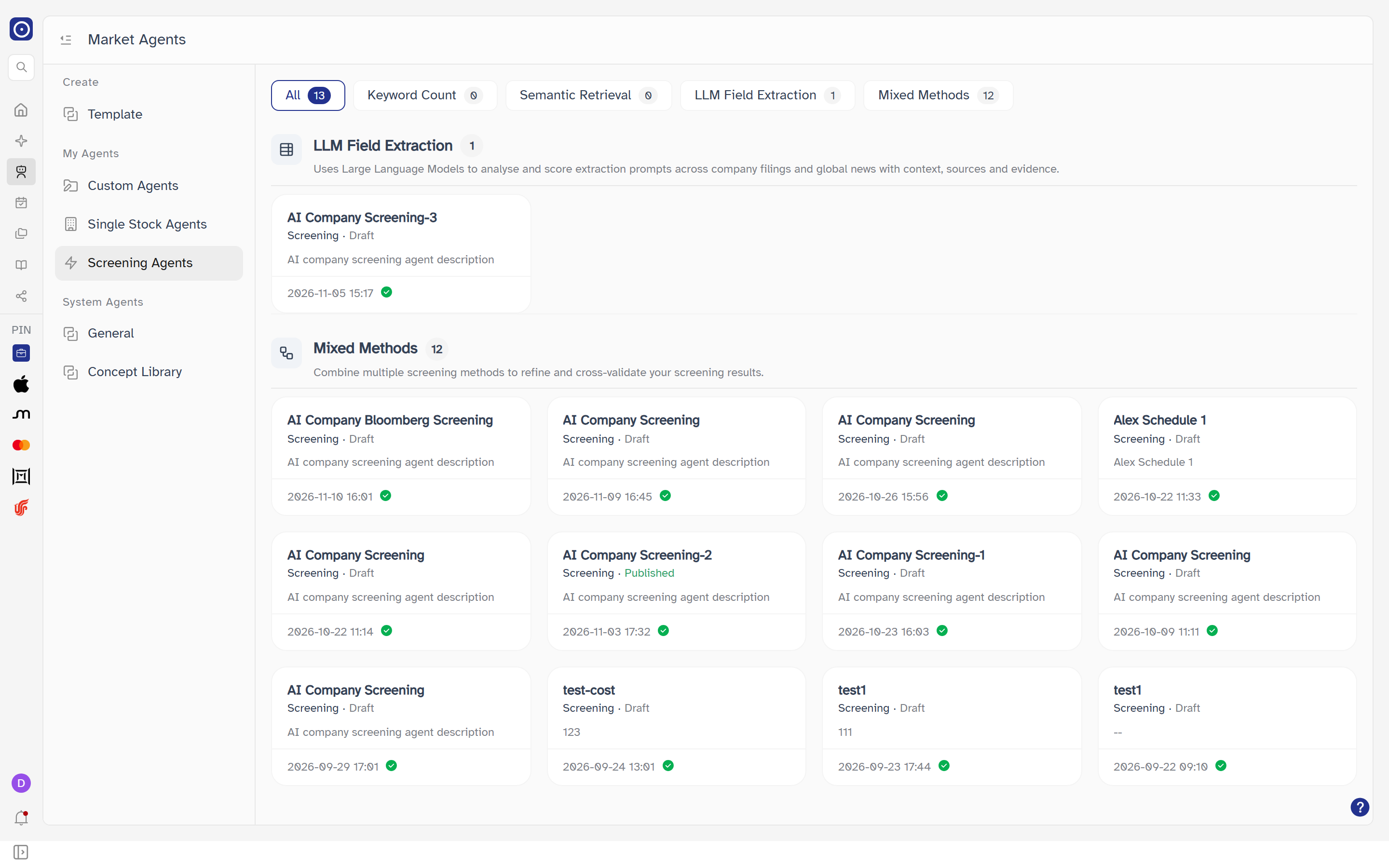
Filtering by method
Once you own at least one screening agent, a row of filter chips sits above the list. Each chip carries the number of agents it holds. All shows every agent, split into one section per method; picking a method chip shows that section alone.
| Chip / section | Which agents it holds |
|---|---|
| Keyword Count | Agents with only Keyword Count · Filings switched on. The section counts how often your keywords appear across annual, interim and quarterly reports, earnings call transcripts, ESG reports, AGM materials, announcements and IR presentations. |
| Semantic Retrieval | Agents with only Semantic Retrieval - Filings switched on. It finds filings that are contextually relevant to your keywords, even when the exact wording differs. |
| LLM Field Extraction | Agents using LLM Field Extraction - Filings or LLM Field Extraction - News (or both), with neither filing-based method above on. It scores extraction prompts across company filings and global news, with context, sources and evidence. |
| Mixed Methods | Everything else: any combination of methods that does not fit the three above. It combines several screening methods to refine and cross-validate results. An agent with every method switched off also lands here, and so does one whose only method is Data Feed - Bloomberg (see the note below). |
The grouping looks only at the four methods above. An agent that also has Data Feed - Bloomberg switched on is still filed by those four — for example an agent with Keyword Count · Filings and Data Feed - Bloomberg sits under Keyword Count. Having Bloomberg as the only method puts it under Mixed Methods.
Which method an agent uses is set on its own page — see The screening agent page. Switching a method there moves the agent to a different section here.
Reading an agent card
Cards carry the same fields as on Agent Marketplace. What is particular to this list:
| Field | Meaning |
|---|---|
| Name | The agent's name, cut short with an ellipsis when it does not fit. An agent saved without one reads Untitled Agent. |
| Type line | Always Screening, followed by Published or Draft. |
| Description | The description you gave it, or -- when there is none. |
| Date | When the agent was last updated, to the minute. |
| Status icon | A small round icon after the date — a green tick in the picture above. It shows how the agent's last run ended and appears only when the agent has a run state. |
| Portfolio badge | The portfolio the agent screens. Hovering it shows the portfolio's name; clicking the name opens it on Portfolio Management. Clicking the badge itself does not open the agent. |
Opening an agent
Clicking anywhere on a card except the portfolio badge opens that agent on The screening agent page.
When you have no agents yet
With no screening agents the filter chips are not shown. The page reads You haven't created any agents — Start building one tailored to your workflow.