
Bloomberg Data Categories
Which Bloomberg commercial model categories the field lists of your recent requests use, and how many fields and requests fall in each.
Administrators only, once Bloomberg credentials are saved — see Bloomberg Connection.
Opening the page
- Click your avatar at the bottom of the left rail and choose Settings.
- Under DATA, select Bloomberg, then Data Categories.
/setting/bloomberg/categories
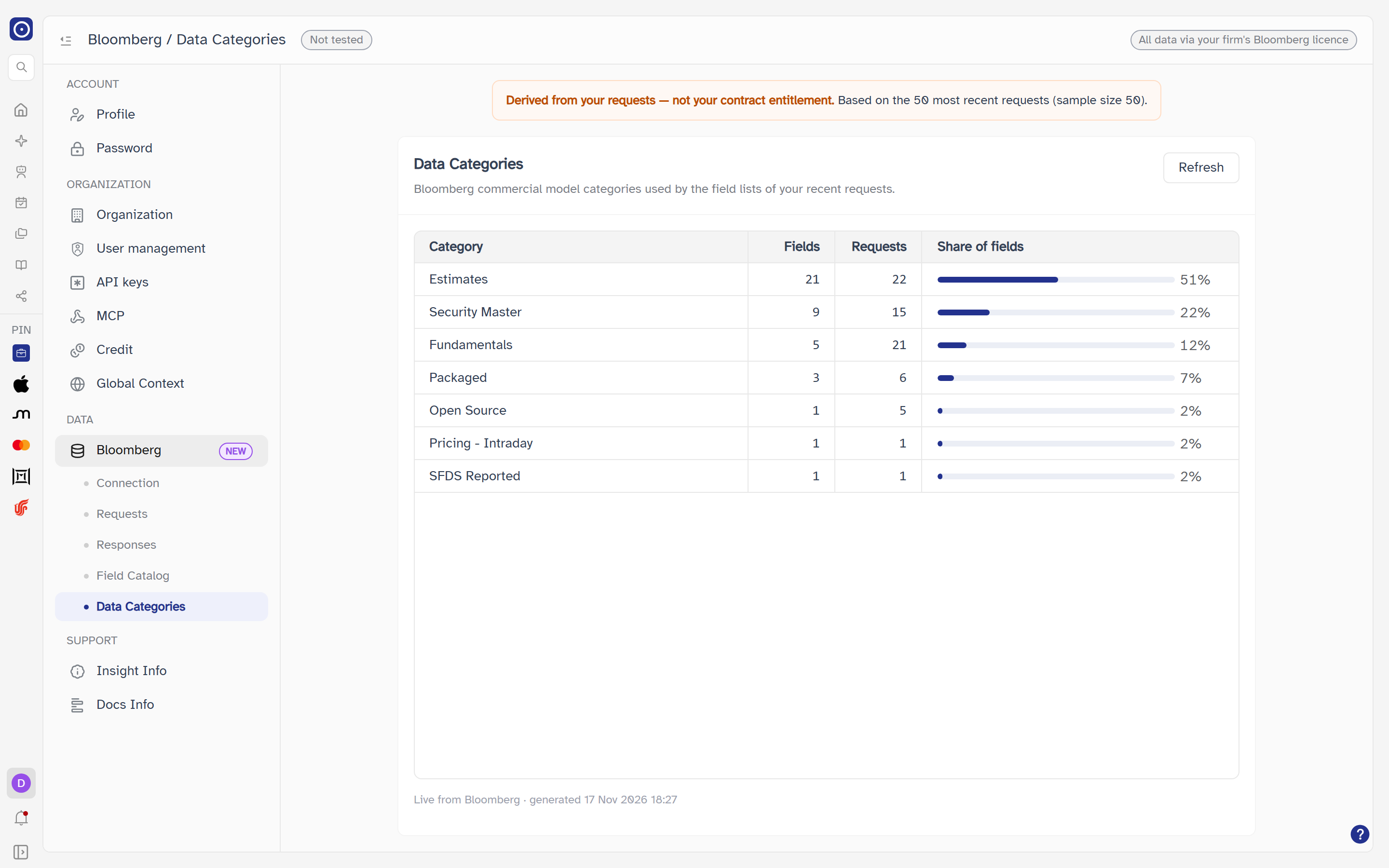
A notice at the top reads Derived from your requests — not your contract entitlement. The page counts what your recent requests use; it does not say what your Bloomberg contract allows. A category missing here is not a category you cannot have.
How the numbers are made
Orbit takes the most recent requests on your Bloomberg account — at most 50 — reads each one's field list from Bloomberg and groups the fields by their commercial model category. It takes a few seconds, and nothing is stored: each time the page loads, or you click Refresh, it is done again. While it works the card reads Aggregating live from Bloomberg — this may take several seconds.
The notice adds the details of the sample:
| Text | Meaning |
|---|---|
| Based on the N most recent requests (sample size M) | N is how many requests were actually considered; M is the most it will take. |
| N request(s) could not be read | Shown only when some requests' field lists could not be read; they are left out of the counts. |
| Some large field lists were only partially read | Shown when a field list was too long to read in full, or the time allowed ran out. The counts for those requests may be low. |
The table
The card is headed Data Categories — Bloomberg commercial model categories used by the field lists of your recent requests.
| Column | Meaning |
|---|---|
| Category | The commercial model category. Fields Bloomberg gives no category appear as (uncategorized). |
| Fields | How many different fields in the sampled requests belong to the category; a field used in several requests counts once. |
| Requests | How many of the sampled requests use at least one field from the category. |
| Share of fields | A bar and a percentage: this category's Fields as a share of the Fields of all categories added together. |
Under the table: Live from Bloomberg · generated followed by the date and time. With no categories the table reads No categories found; if it cannot be built the card reads Failed to load data categories with a Retry button.
| Control | What it does |
|---|---|
| Refresh | Builds the table again from Bloomberg. Disabled while it is loading. |
The page only reads from Bloomberg. Nothing is changed on Bloomberg or stored in Orbit.
Where the page leads
| From | To |
|---|---|
| Looking up an individual field's category | Bloomberg Field Catalog |
| Seeing which requests the counts come from | Bloomberg Requests |
| Setting up credentials | Bloomberg Connection |